Instagram Stories - Winter Season: Elevate Your Cold-Weather Content
The Visual Essence of Winter Captured in a Template
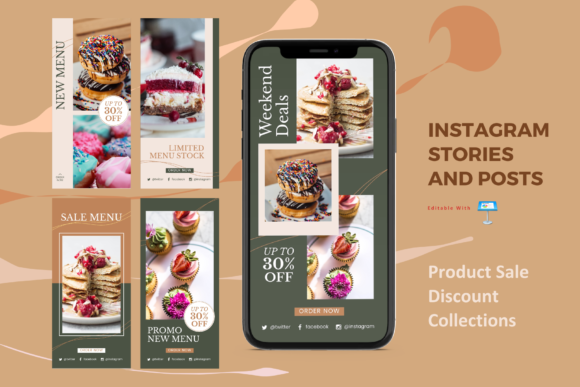
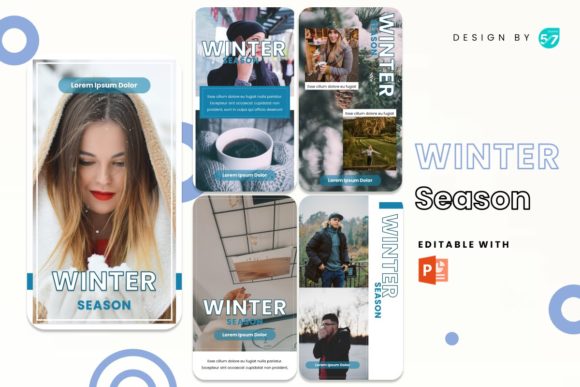
When the temperature drops, your Instagram feed shouldn't have to suffer from visual monotony. The Instagram Stories - Winter Season template is more than just a set of slides; it is a curated visual atmosphere. It captures the specific "personality" of the colder months—think crisp air, warm lattes, and the cozy hygge aesthetic—without relying on cliché snowflakes. The style is distinctly modern and elegant, utilizing clean lines and thoughtful negative space to let your photography breathe. The layouts are professional, ensuring that whether you are showcasing a new winter coat or a holiday menu, the design feels high-end. It balances creative energy with structure, providing a unique foundation that feels current and sophisticated.
Why This Template Fits Your Niche
You might be wondering if a seasonal template is too specific. In reality, the Instagram Stories - Winter Season template is incredibly versatile. Its neutral yet atmospheric design makes it a powerhouse for various industries. If you run a Coffee Shop or Cafe, these slides are perfect for highlighting a new seasonal blend or a cozy corner of your shop. For Restaurant and Food & Beverages businesses, it provides a backdrop that makes warm dishes look even more appetizing.
However, it doesn't stop at hospitality. Fashion brands can use the elegant layouts to present winter collections, while general Business professionals can use the clean aesthetic for end-of-year reports or winter sale announcements. The design acts as a vessel; it enhances your content rather than competing with it, making it suitable for anyone from a local boutique to a corporate marketing team.
Streamlining Your Workflow with Practical Features
As a designer or business owner, your time is your most valuable asset. The technical execution of the Instagram Stories - Winter Season template is built around efficiency. One of the standout features is the inclusion of a Picture Placeholder. This means you don't need to fiddle with complex masking or cropping tools. You simply Drag and Drop your high-resolution images into the designated areas, and the layout does the heavy lifting.
Furthermore, the template is Based on Master Slides. This is a crucial feature for maintaining brand identity. If you need to adjust the global layout or ensure consistency across all five slides, the Master Slide functionality allows you to do so with a few clicks. The graphics are fully resizable and editable, meaning you can scale elements up or down without losing quality, ensuring your social media graphics look sharp on any device. The recommendation to export to JPG or PNG files at 1080 x 1080 pixels ensures your posts meet the platform's standards for maximum readability and clarity.
Design Observations: Typography and Hierarchy
While the template focuses on layout, it strongly influences how text interacts with imagery. The design relies on modern typography principles, utilizing free web fonts that are easily accessible. This is a massive advantage for small business owners who may not have subscriptions to expensive font foundries. By using recommended free fonts, the template ensures you can replicate the exact look of the preview without hidden costs.
Visual hierarchy is embedded in the slide structure. The layouts guide the viewer's eye from the main image to the supporting text naturally. Whether you use a bold display font for a headline or a clean sans serif font for body copy, the spacing provided by the template ensures there is no visual clutter. This attention to spacing improves audience engagement, as users can quickly digest the information before the story advances. It’s a practical application of editorial design principles applied to a digital format.
Maximizing Impact Across Different Platforms
While designed for Instagram Stories, the 1080 x 1080 pixel square format is the gold standard for versatility. This dimension works perfectly not just for Stories, but for the main Instagram Feed, Facebook posts, and even Pinterest pins. If you are a blogger or content creator, you can design once and publish across multiple channels, maintaining a consistent visual language.
Consider using these layouts for packaging design mockups. If you sell physical products, placing your product photos inside these professional frames can elevate a simple product shot into a lifestyle advertisement. For marketers, the clean structure is ideal for data visualization or announcing flash sales, where clarity and immediate impact are paramount. The "Winter Season" aspect adds a timely relevance that can boost recognition during the Q4 shopping rush.
Practical Guidance for Implementation
To get the most out of the Instagram Stories - Winter Season template, start by evaluating your current brand palette. The template’s colors are likely seasonal, so check if they complement your existing brand assets. Since the graphics are editable, you can easily shift the color hues to better match your specific brand identity while keeping the winter vibe intact.
When testing font pairing, look at the included documentation file. It will guide you on which script font or serif font pairs best with the layout's geometry. A common mistake is using a font that is too ornate for the small screen size of a mobile story; stick to the recommended sans serif options for small text to ensure legibility. Finally, remember that while the images in the demo are for preview, the power of this template lies in your own photography. Use high-quality, well-lit images to fill the placeholders, and the professional structure of the template will do the rest to engage your audience.