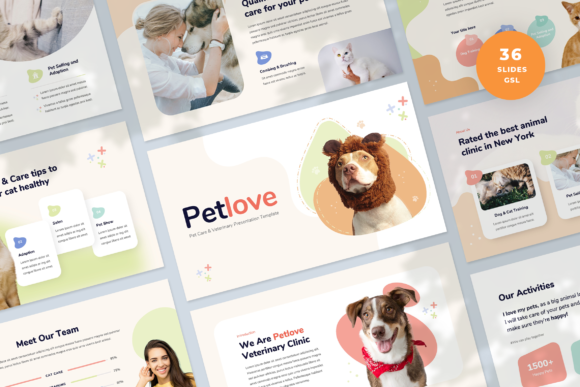
Pet Care & Veterinary Google Slides: A Modern Template for the Pet Industry
In the pet care and veterinary world, a professional image is everything. Whether you're a veterinarian presenting a new treatment protocol, a dog trainer pitching your services to a local shelter, or a pet hotel owner showcasing your luxury suites, your presentation needs to be as polished and trustworthy as your practice. A cluttered, generic slide deck can undermine your credibility before you even speak. This is where a specialized tool like the Petlove Presentation Template for Google Slides becomes invaluable. It’s more than just a set of slides; it's a design system built to communicate care, expertise, and modern professionalism to a specific audience.
Visual Style and Professional Appeal
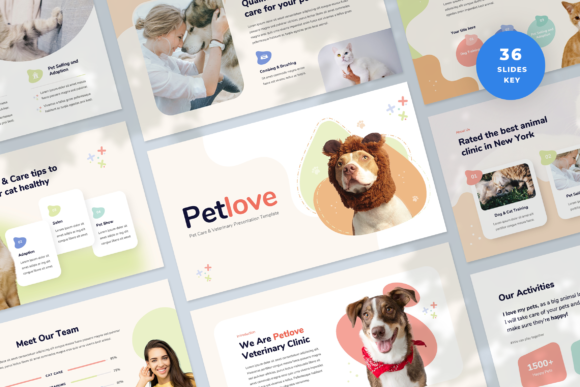
The Petlove template immediately establishes a clean, contemporary aesthetic. Its personality is friendly yet professional, avoiding overly playful clipart in favor of sleek lines, balanced layouts, and ample white space. This approach ensures the focus remains on your content—whether that's medical data, business metrics, or service descriptions—while subtly reinforcing a brand image that is organized, current, and detail-oriented. The visual style is versatile enough for a serious veterinary clinic board meeting yet warm enough for a community-focused animal shelter update. It uses a modern sans serif font hierarchy that promotes excellent readability on screens, a critical factor when presenting complex information to clients or partners. The 16:9 widescreen ratio is standard for modern displays, ensuring your presentation looks sharp and fills the screen properly without awkward black bars.
What makes this template particularly effective is its structure based on Master Slides. This isn't just a collection of 36 one-off pages; it's a cohesive system. Changing a color on the master slide propagates that change throughout the entire deck, guaranteeing brand identity consistency. The inclusion of picture placeholders is a practical time-saver. Instead of struggling with image formatting, you simply drag and drop your photos of facilities, happy pets, or team members into pre-sized frames. This allows you to create a visually rich presentation quickly, which is a huge advantage for busy professionals who need to prepare pitches, portfolios, or internal reports efficiently.
Practical Applications Across the Pet Industry
The true strength of the Pet Care & Veterinary Google Slides template lies in its adaptability. It’s not a one-size-fits-all solution; it’s a tailored toolkit for a niche market. For a veterinary clinic, it’s perfect for creating client education materials about preventative care, presenting new service packages to the team, or building a portfolio for potential investors. The clean layout helps present medical information without causing visual overload, enhancing patient and client understanding.
For businesses in the service sector like dog training schools, pet hotels, and grooming salons, the template is a powerful marketing asset. Use it to develop a sleek business portfolio that showcases your facility, staff expertise, and success stories. The professional polish can make the difference when pitching to high-end clients or corporate partners. Animal shelters can leverage it to create compelling adoption drives, volunteer training presentations, or fundraising pitches for donors. The modern design helps convey that the organization is well-run and trustworthy, which is crucial for building community support.
Even pet product entrepreneurs and pet bloggers can find value here. When pitching a new line of eco-friendly toys to retailers or presenting a content strategy to a brand partner, this template provides the professional framework needed to be taken seriously. It transforms your data and ideas into a clear visual narrative, which is essential for capturing the attention of decision-makers in a competitive market.
Maximizing Your Presentation's Impact
Using a premium template like Petlove effectively involves more than just plugging in your text. To truly wow your audience, consider these practical steps. First, customize it to your brand. Use the Master Slides to insert your logo and adjust the color palette to match your existing brand identity. This creates instant recognition and reinforces your professionalism. The resizable graphics make this process straightforward.
Next, focus on visual hierarchy and readability. The template’s design already establishes a strong hierarchy, but your content placement is key. Use the provided layouts to balance text with images. Avoid overcrowding slides; let the white space work for you to make key points stand out. The recommended free web fonts ensure your presentation will render correctly on any computer, avoiding last-minute formatting disasters. When preparing for a critical pitch, always test your final presentation on the actual screen or projector you’ll be using. Check that text is legible from the back of the room and that colors appear as intended.
Finally, think beyond the initial project. This template is a design asset that can be repurposed. The structure you build for a client pitch can be adapted into an internal training deck. A fundraising presentation can be modified into a community awareness campaign. By treating the template as a flexible starting point rather than a finished product, you maximize your investment and maintain a consistent, professional look across all your communications. In a field built on trust, a polished, coherent presentation isn't just nice to have—it's a strategic tool for building credibility and achieving your business goals.