Softly PowerPoint Template: A Designer's Guide to Clean Slides
When you sit down to build a presentation, the last thing you want to do is fight with formatting. You have a message to deliver, a pitch to win, or a workshop to lead. The Softly - Powerpoint Template is designed specifically to remove that friction. It isn’t just a collection of slides; it is a structured system of 60+ creative screens built on a 16:9 Full HD foundation. For entrepreneurs, marketers, and creative professionals, this template offers a bridge between raw ideas and a polished visual narrative. It allows you to focus on your story while the design assets handle the heavy lifting of visual hierarchy and consistency.
Anatomy of Modern Presentation Design
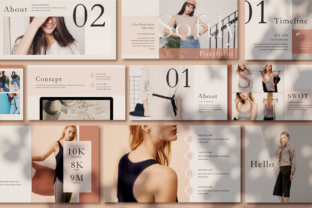
The visual personality of the Softly template leans into modern minimalism without feeling cold. It strikes a balance that works across various industries—from a corporate quarterly review to a creative portfolio showcase. The style relies on clean lines and ample white space, which is crucial for readability. In the world of presentation design, clutter is the enemy of engagement. Softly addresses this by utilizing drag-and-drop object placeholders. This feature is a game-changer for those who aren't deep-dive graphic designers. It ensures that when you insert an image, it snaps perfectly into the grid, maintaining the visual flow the designer intended.
Furthermore, the use of Master Slides is the backbone of this template's efficiency. For anyone managing a brand identity, consistency is paramount. By editing the master slide, you can change the look and feel of the entire deck in seconds. This is particularly useful for small business owners who might need to adapt the presentation for different clients or internal teams. The "Softly" approach here is about control; you have unlimited color options to match your specific brand palette, ensuring that the presentation feels like a natural extension of your marketing materials rather than a generic add-on.
Vector Objects and the Power of Customization
One of the standout technical specifications of the Softly template is that all objects are vector-based and smart objects. Why does this matter to you? In practical terms, scalability. Whether you are projecting your slides on a massive conference screen or sharing a compressed PDF on a tablet, the graphics remain crisp. You won't encounter the pixelation issues that plague lower-quality design assets.
This vector-based approach also ties into the unlimited color options. Because the elements are vector-based, you can recolor individual icons, shapes, and text blocks to match specific campaign needs. Imagine you are a marketing strategist pitching a rebrand. You can take the Softly layout and instantly swap the color scheme to match the client's new hex codes. This flexibility transforms the template from a static file into a dynamic tool for creative font usage and color theory application. It allows for a level of customization that usually requires advanced software skills, democratizing good design for bloggers and content creators alike.
Integrating Typography and Content Strategy
While the template provides the structure, the content you bring defines the success. The template utilizes free fonts, which is a significant advantage for commercial use. You don't have to worry about licensing fees for your typeface, which is a common headache in packaging design and web design. The layout supports a clear typographic hierarchy—using size and weight to guide the viewer’s eye from the headline to the supporting body text.
When filling out your slides, pay attention to the visual hierarchy. The Softly template is designed to keep the audience engaged, but it requires your cooperation. Avoid the temptation to fill every white space with text. Use the "Image used" placeholders to bring in high-quality stock photography that complements your message. Remember, the stock photos are not included in the download, which gives you the freedom to select imagery that perfectly represents your specific demographic. This ensures your presentation feels authentic to your brand, rather than using generic images that your audience might recognize from other sources.
Practical Applications for Professionals
The versatility of the Softly - Powerpoint Template makes it suitable for a wide range of professional scenarios. Here is how different segments of the audience can leverage this tool:
- Entrepreneurs and Startups: Use the clean layouts for investor pitches. The professional structure helps build trust and credibility, which are essential when asking for funding.
- Marketers and Brand Strategists: Utilize the deck for campaign kick-offs or strategy presentations. The ability to customize colors ensures the deck aligns with the client's brand identity.
- Educators and Bloggers: Transform blog posts or workshop content into engaging slide decks. The drag-and-drop feature makes it easy to incorporate diagrams and data visualizations.
- Designers: Use it as a starting point for client mood boards or project proposals. The smart objects allow for quick mockups.
Finalizing Your Presentation
Before you present, always review the technical details. The specification calls for a 16:9 screen ratio, which is the standard for modern widescreen displays. Ensure your projection setup matches this to avoid black bars on the side of your screen. Also, take a moment to review the "Font & Help" PDF included with your purchase. It contains specific details regarding the typography used, which is helpful if you need to install the fonts on a new device or ensure compatibility.
Ultimately, the goal of the Softly template is to help you look presentable in front of your audience. It removes the technical barriers to modern typography and layout design, allowing you to deliver your message with confidence and clarity. Good luck with your presentation.